
Class Page
Digital Design is a class where students have the opportunity to experiment with different features of online platforms testing their creative and technological skills. This page will feature some of the assignments that will be completed so stayed tuned for some exciting new graphics!!
%20(2)%20copy.jpg)
Design Your Own Room
For this project we had to create a room by cutting and pasting images from the web to create a cohesive and realistic space that reflected who we were. We had to use 20 images in this space and use tools like transform and quick selection to make the images look precise and in perspective. Click on the Pdf to the left of the image to find out why I chose each of these images!
%20copy.jpg)
%20copy.png)
%20copy.jpg)
%20copy.png)
Design Your Own Logo
This project was also a an expression of our own personal identity. The task was to create two logos, and abbreviated and full, with a front and structure that we liked. I decided to use a set of complimentary colors and stack the initials over my last name to create a professional looking logo. Additionally, the drop shadow added to the letters creates a more bold look as well.


Jumping Out Image
This project entailed choosing a person and an animal to jump out of the canvas. Using Photoshop tools such as perspective, the clone stamp tool, adjustments, and others I was able to achieve this look. For the images I decided to choose Alex Morgan because I am a huge fan of hers and her career on and off the field is truly inspiring. Secondly, I chose a dolphin because I believed that its posture jumping out would be aligned with the jumping out prompt.

Movie Poster
To create our own movie poster we had to first choose an enticing poster that we would fit nicely into as one of the main characters. I decided to chose Rogue One because I like the cool toned filter that was applied to it as well as the formation of the characters. Ironically, I have never watched this movie before, but I am going to definitely check it out soon. Some of the edits I preformed to make my face fit into the poster were the erase tool, color balance, and tilt tool. For the font I decided to chose the Castellar font because it matched seamlessly with the font already on the poster. Overall, I thought this project was very creative and enjoyable to make!

TV/Movie Combo
The TV Movie Combo project was probably my favorite project so far! I decided to combine the popular show the Summer I Turned Pretty with the classic movie Pretty in Pink! Some edits I made were adjusting to black and white and changing to opacity of the top layer to match the proportions of the faces nicely.

Battle of Redwater
This project was a culmination of many Photoshop skills. The task was to create a movie poster with the characters of Ariana Grande and Arnold Schwarzenegger as pirates defending the land against an alien invasion and the precious treasure. I did have some difficulty, however, finding a suitable picture of Schwarzenegger in color as I wanted to portray him younger, so I decided to mix black and white images with a captivating and exciting background with many colors and action. I think visually the poster is balanced despite the chaotic elements and I believe the font choice embodies the character of the movie.
For this assignment we had to create our own movie poster with any two actors and had to create our own plot. Starring Chris Evans and Angelina Jolie, The Alliance of Cartnon is a galactic love story between two leaders of rival planets. After light years of violence the two create an alliance between their two planets and take on other galaxies together. Some edits I conducted were erasing with low opacity, using the brush tool for the lasers, and moving around layers to create the appearance I wanted. Overall, this project tested my creative skills and also helped me to create a cohesive image because I had to stick to the script.

Create Your Own
Movie Poster
Letter Off

This project entailed choosing a movie and changing a singular letter to change the meaning of the movie and the way the characters act or behave. I decided to chose Bullet Train and change it into Mullet Train. I tried to vary the types of hair also to make sure the poster still looked balanced as well as clean.

Christmas Card
For this project we had to create a holiday card with four pages. For the middle two we had to add some festive messages and also had to rotate the images as a whole so when the card is printed out and folded they can be right side up. This also gave us the opportunity to add folders in our layers, which made it much easier when rotating because we were able to lock the layers.

Promotional Poster
This task was to create a promotional poster for Digital Design. I decided on a papyrus font to bring alive the the quest feature. I also decided to make the background a keyboard to emphasize the foundation of the class.
.jpg)
Buc Logo
This was definitely a difficult project to complete. The task was to recreate our school logo with the blob tool in Adobe Illustrator. Navigating this new platform was a challenge to say the least, but in the end this project was a great introduction to the website. By adding strokes I was also able to add the cartoon like effect to the buccaneer and edited
Collage
For this project we were unfortunately participating in virtual class. These pictures are a collection of different prompts from a scavenger hunt and the task was to compile them in an appealing format. The platform I used was Canva and through this website I was able to create various shapes to hint to the prompt I decided on.
![New BUC Pirate KR [Recovered] (3).jpg](https://static.wixstatic.com/media/588b28_914fca75715c4dbba55492409b67bc44~mv2.jpg/v1/fill/w_193,h_200,al_c,q_80,usm_0.66_1.00_0.01,enc_avif,quality_auto/New%20BUC%20Pirate%20KR%20%5BRecovered%5D%20(3).jpg)

Window View
For this task I had to upload a picture of a window and through editing techniques such as perspective and distort I changed the view to a jungle landscape. I had to add at least five details so I decided on adding many animals that reside in the jungle such as a jaguar, a sloth, a snake and more!
Creative Buc
To create our own Buccaneer we had to use the template from our last recreation and use techniques such as the blob tool to add new attributes. I decided to make a Hippie Buc because I wanted to bring in more color than just maroon and gray. Overall I enjoyed this task.
![Hippie Buc KR [Recovered] (3) copy (1).jpg](https://static.wixstatic.com/media/588b28_f30fc0cc225249b4ba2b7f154e0d61b0~mv2.jpg/v1/crop/x_26,y_0,w_541,h_532/fill/w_188,h_180,al_c,q_80,usm_0.66_1.00_0.01,enc_avif,quality_auto/Hippie%20Buc%20KR%20%5BRecovered%5D%20(3)%20copy%20(1).jpg)

Cartoon Self
To create a cartoon version of myself I had to first upload a reference picture to put as my background layer. Then with the blob tool replicate each portion of my face. After I used the blur tool in the edit drop down to give myself for depth.
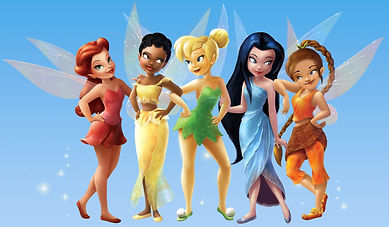
Star in Cartoon
This project was also very difficult, but satisfying to complete. We had to insert ourselves into a cartoon character so I decided on Fawn (far right) from the Tinker Bell Series. I chose her because she already has my signature braid and is dressed in my favorite color. Some of the edits I made were to her nose, face and eye shape to still inhibit the integrity of the original style, but also resemble some of my features. of my own face. Additionally, I took out her bangs and also made her arms a bit more muscular.
Create Your Own Font
For this assignment I was tasked with creating my own authentic font in Adobe Illustrator. Using the Blob tool I was able to create the organic shapes I wanted and used the eraser tool to create different sized holes throughout the letters and symbols. Overall, I enjoyed this project because it tested both my creativity and technological skills! Soon I will be able to download this font into my computer and use it in future projects!

New Logo
This project entailed creating a new logo incorporating our cartoon face and the new font that we created. Overall, this project enabled me to combine most of my Illustrator skills including moving layers to create the coral border and using the blob tool to create the lime green dots and add more volume and dimension to my hair.
Famous Cartoon
This project has been my favorite so far! We were tasked with recreating a famous artwork in Adobe Illustrator manipulating the blob tool, and the artwork to the right is my recreation of Edward Degas' pastel composition titled "Blue Dancers." I was immediately drawn to this work because of my experience with impressionism and taking this style into the digital realm was definitely a unique experience. By blotting a variety of colors onto different layers I was able to replicate the impressionist technique that Degas employs. Overall I love the amount of color in this work and had fun experimenting with different layers and opacity to achieve the pastel-like texture.
